Deriving Display State
How separating semantic game state from display state makes it easy to view different Catan games.
This blog post belongs to a three-part series: Responsive and Resilient Catan Board
- Responsive Hexagonal Grids
- Deriving Display StateNow Reading
- Resilient Road Placement
In the previous post, we discussed how to build a responsive Settlers of Catan UI. In this post, we’ll talk about how to take a particular game state and render it on the UI.
Game State Scenarios
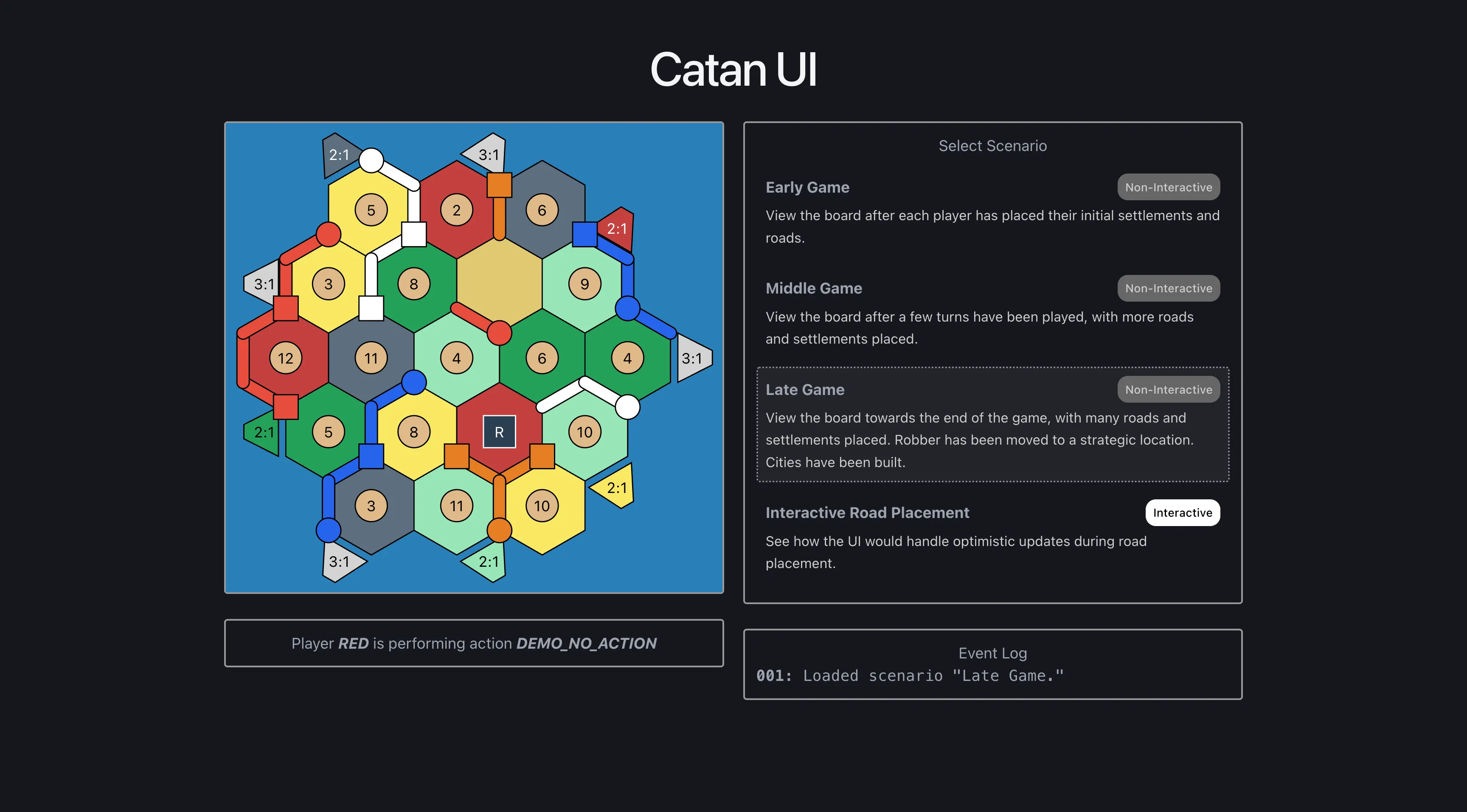
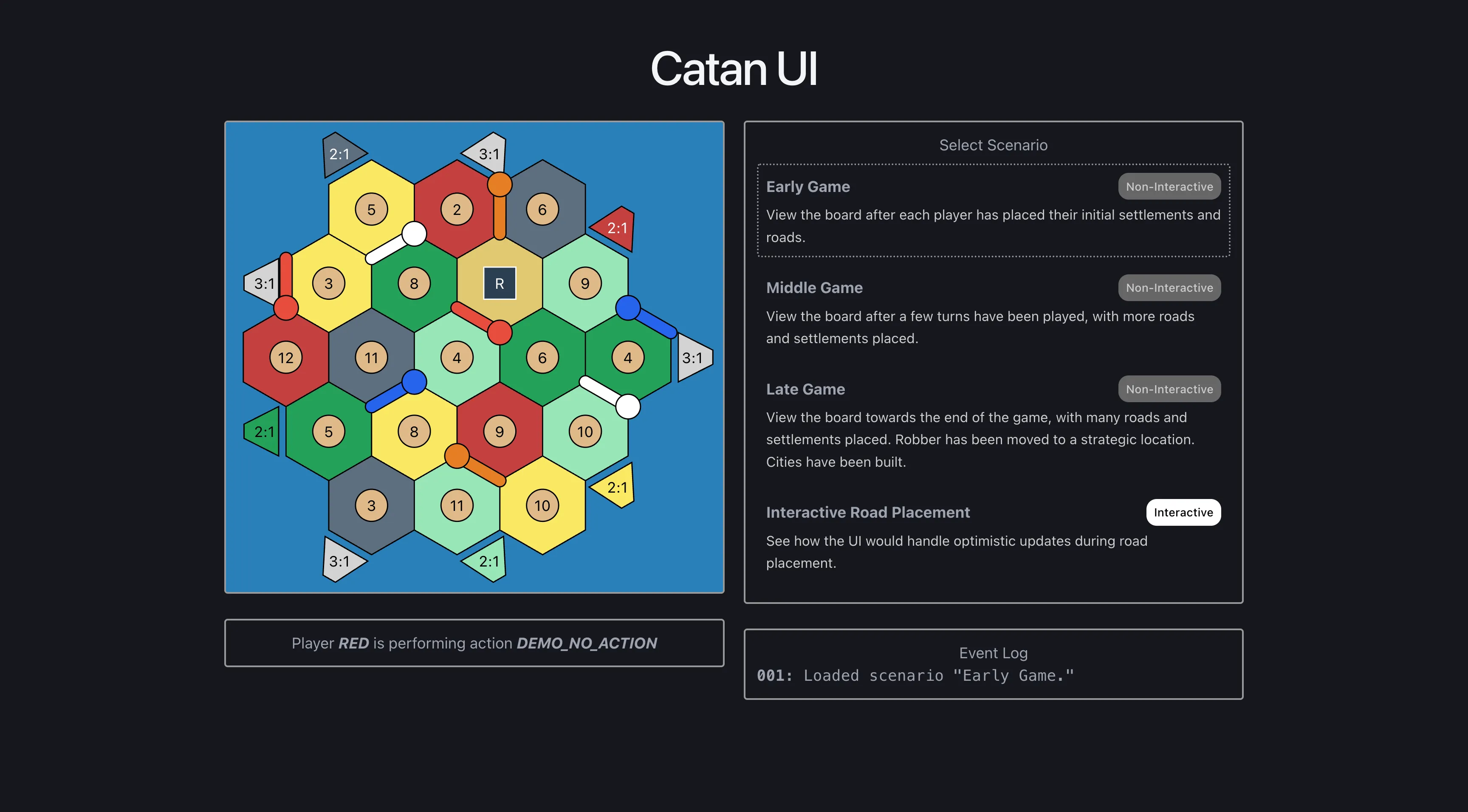
To start, we can explore the Scenario Selector. This selector holds both static and interactive game scenarios:
- Early, middle, and late stage games can be statically viewed to get a feel for the UI’s layout.
- The final scenario demos interactive road placement restricted to legal positions.
- The Event Log displays any UI actions taken and any internal decisions that were made.
We’ll dive into the interactive scenario further below, but for now we can see the board renders correctly and can represent complex game state.
Representing Game State
We can think about the game’s state from two distinct perspectives. One perspective lets us reason about the game like a normal Catan player would. The other lets us draw the game accurately on any screen.
Semantic State
The semantic game state is concerned with the natural way we describe Catan games. If using Domain Driven Design principles, this is the state that a backend server would use.
“The red player has three roads, two settlements, five wheat resources, and it’s their turn to roll.”
This is captured in a single GameState interface:
interface GameState {
  board: Board; // most display state is derived from this
  currentAction: GameAction;
  currentPlayer: PlayerColor;
}
Board breaks the physical board into four maps, each keyed by an ID string that represents a particular board location.
interface Board {
  tiles: TileMap; // i.e., hexagons
  settlements: SettlementMap;
  roads: RoadMap;
  ports: PortMap;
}
Each map entry is a small, self-contained record. A road is just an ID (board location) and a color:
interface Road {
  id: string;
  color: BoardColor;
}
type RoadMap = Record<string, Road>;
The color is authoritative server state. BoardColor.PLAYER_RED means red owns that road. An empty road map means no roads have been placed yet.
Note that these maps define different pieces and locations on the board, but contain no details about pixel positioning, geometry, styling, or onClick listeners.
Display State
The display state is concerned with exact colors, lines, and pixel positions of SVG DOM elements.
“There should be a polygon with vertices
(34, 12), (45, 78), ...filled with hex color#eee. There should be a red line drawn from(13, 25)to(40, 25). The wheat count label should show ‘5.’ The action status should show ‘Player red please roll.’”
This is captured in a single HexagonGrid interface:
interface HexagonGrid {
  hexagons: Hexagon[];
  vertices: Vertex[]; // i.e., circles
  edges: Edge[]; // i.e., lines
  trapezoids: Trapezoid[];
  centers: Center[];
}
Each geometry object (e.g., Center) carries both an idExternal (semantic game state id) and an idInternal (display state id) for translation between GameState and HexagonGrid. All other fields on these objects hold coordinate or styling info.
An Edge (road) object looks like this:
interface Edge {
  idInternal: string;
  idExternal: string;
  x1: number;
  y1: number;
  x2: number;
  y2: number;
  color: BoardColor;
  visible: boolean;
}
Geometry objects like Edge get mapped to React components (SVG elements) with CSS styling and onClick listeners tacked on.
Deriving Display State from Semantic State
buildHexagonGrid(board: Board) is a pure function that converts semantic game state (Board) into display state (HexagonGrid). We take semantic values like type RoadMap = Record<string, Road> and convert them into many geometry objects like Edge.
export function buildHexagonGrid(board: Board): HexagonGrid {
  const hexagons = buildTiles(board.tiles);
  const { vertices, edges, edgeTileCount } = buildVerticesAndEdgeCounts(
    hexagons,
    board.settlements,
    board.roads,
  );
  const trapezoids = buildTrapezoids(hexagons, edgeTileCount, board.ports);
  const centers = buildCenters(hexagons, board.tiles);

  return {
    hexagons,
    vertices,
    edges,
    trapezoids,
    centers,
  };
}
For example, to build Hexagon objects (tiles):
- Loop through all hardcoded internal hexagon IDs (19 of them).
- Look up relevant hexagon info from the semantic game state (mostly the Catan resource color).
- Compute the center pixel coordinate of the hexagon.
- Compute the six vertices’ pixel coordinates relative to the center pixel.
const pad = (n: number) => String(n).padStart(2, "0");

function buildTiles(tileMap: TileMap): Hexagon[] {
  return TILE_COORDS.map(([q, r], i) => {
    const idInternal = `tile_q${pad(q)}_r${pad(r)}_i${pad(i)}`;
    const idExternal = tileInternalToExternal(idInternal);
    const externalTile = tileMap[idExternal];
    const pixel = hexToPixel(q, r);
    return {
      idInternal,
      idExternal,
      q,
      r,
      color: externalTile?.color ?? TILE_COLOR,
      center: pixel,
      vertices: getInsetVertices(pixel),
    };
  });
}
Note that all hexagons are always displayed, unlike roads and other pieces that may not have been placed yet. Therefore, we can make assumptions about every internal ID matching up nicely with an external ID.
Rendering the React Component
Once we have built the HexagonGrid data type that represents display state, we can use it as input to the HexagonGrid component. Within the component, geometry objects (e.g., Edge) are filtered out of the HexagonGrid data type if they should not be visible.
{hexagonGrid.edges
  .filter((edge) => edge.visible)
  .map((edge) => <Edge key={edge.idInternal} edge={edge} ... />)}
The resulting list of visible SVG elements is then placed appropriately in the larger <svg></svg> parent.
Potential Optimization:
buildHexagonGridallocates an object for every possible location on the board, then these objects are filtered down during component rendering. Only allocating visible objects and removing thevisibleflag entirely could be more efficient.
Benefits of Separate State
The separation of semantic and display state helps manage complexity. Consider a situation where you want to show roads that are available for a user to select. These roads are not meaningful to the server or, at the very least, are only relevant to a single player fetching from the server. Displaying selectable roads is almost entirely a UI concern.
With separate state, selectable roads do not clutter the semantic roadMap. Multiple players can fetch the same semantic game state and derive their own display states. If we support multiple clients (e.g., mobile and desktop), we can derive the slightly different display state needed to represent the same selectable roads.
We can determine which roads are selectable in one of two places: on the client or on the server. In both cases semantic and display state remain separate. This choice shapes how much the frontend has to know and what our semantic state includes. Both options come down to a change in the builder’s signature.
// client side: frontend computes legal roads
buildHexagonGrid(board: Board, currentAction: GameAction, currentPlayer: PlayerColor)

// server side: server sends the legal roads
buildHexagonGrid(board: Board, possibleActions: PossibleAction[])
The client side version works entirely from semantic state the frontend already has. It passes the current action and player into the builder and computes the selectable roads itself. The catch is that computing them means knowing the rules of Catan. To show which roads are legal, the frontend has to decide where a road can go, so it stops being a thin renderer and takes on game logic.
The server side version keeps the client a thin renderer that only draws the PossibleAction values it is given (e.g., Road R46 is available to Player P3). We make the semantic state more complex, but listing which moves are immediately playable is how people naturally talk about Catan games.
In reality, the demo takes a shortcut. The selectable roads are written directly into the scenario’s
roadMapasRoadrecords with a specialBoardColor.SELECTABLEcolor. This keeps the demo self-contained (buildHexagonGridneeds no extra arguments), but display concerns are mixed into the semantic state.
Conclusion
We’ve seen how semantic game state gets derived into a fully drawn board. So far, the board has been read only. It shows a game, but clicking elements on it does nothing.
In the next post, we’ll make selectable roads interactive. A player will place a road, the board will update immediately, and the frontend will reconcile with the server in the background.