Running LLMs Locally with Ollama
Testing which LLMs my NVIDIA GeForce RTX 4060 Ti can run locally through Ollama.
This blog post belongs to a three-part series: Running LLMs Locally
- Running LLMs Locally with Ollama (this page)
- Ollama Copilot Integration
- Using LM Studio's Chat Interface
Is there any value in running small LLMs locally when all the big tech companies offer free credits for truly large LLMs? Will my graphics card explode under my desk?
Running Our First Ollama Inference
I have the following system specs, displayed courtesy of screenfetch.
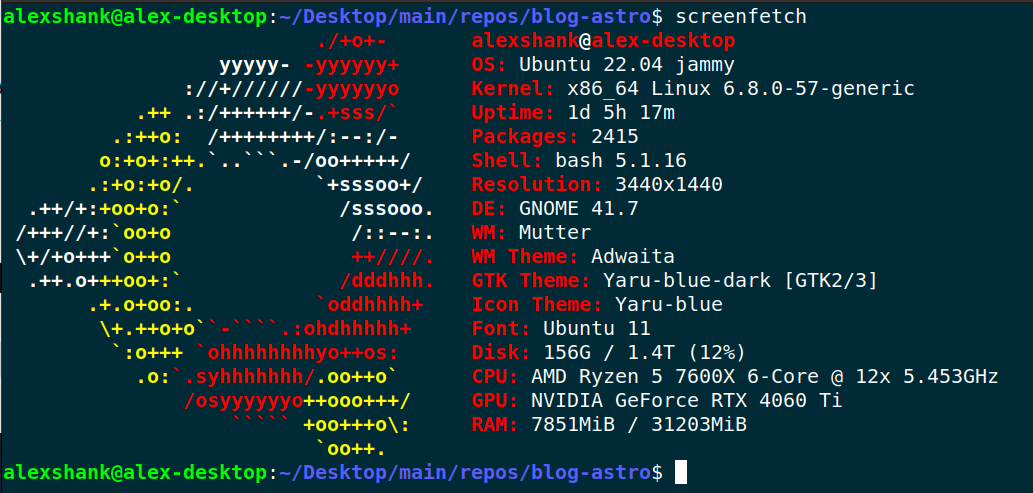
The key takeaway is that I have 16 GB of VRAM available on my GPU, so I’m limited to models that are around that size. (It turns out, the sweet spot for model size ends up being about half my available GPU VRAM. This is because inference on large context eats up the remaining VRAM.)
To begin, I simply Google’d “run llms locally” and chose to follow this useful guide from Jeremy Morgan. Here are the two commands I needed to get up and running. Beware of piping commands into sh.
curl -fsSL https://ollama.com/install.sh | sh
>>> Installing ollama to /usr/local
[sudo] password for alexshank:
>>> Downloading Linux amd64 bundle
######################################################################## 100.0%
>>> Creating ollama user...
>>> Adding ollama user to render group...
>>> Adding ollama user to video group...
>>> Adding current user to ollama group...
>>> Creating ollama systemd service...
>>> Enabling and starting ollama service...
Created symlink /etc/systemd/system/default.target.wants/ollama.service → /etc/systemd/system/ollama.service.
>>> NVIDIA GPU installed.
alexshank@alex-desktop:~/Desktop/main/repos/blog-astro$ ollama run mistral-small3.1
pulling manifest
pulling 1fa8532d986d... 100% ▕████████████████████████████████▏  15 GB
pulling 6db27cd4e277... 100% ▕████████████████████████████████▏  695 B
pulling 70a4dab5e1d1... 100% ▕████████████████████████████████▏ 1.5 KB
pulling a00920c28dfd... 100% ▕████████████████████████████████▏   17 B
pulling 9b6ac0d4e97e... 100% ▕████████████████████████████████▏  494 B
verifying sha256 digest
writing manifest
success
>>> hello
Hello! How can I assist you today?

> > > What's the capital of italy?
> > > The capital of Italy is Rome.
Browsing Available Models
Before I ran the above prompt, I looked at the most popular models on the Ollama site and chose mistral-small3.1. There’s a good amount of buzz around Mistral, and it even has some vision capabilities.
I’m not overly concerned with the quality of individual models, though. I’m interested in the capabilties and features of the models, along with Ollama’s integrations. Let’s explore the following capabilities and selected models, which I very briefly researched. In retrospect, I’ve noted the capabilities Ollama could not support.
| Model Name | Parameters | Capabilities |
|---|---|---|
mistral-small3.1 | 24 billion | Text + Image -> Text Generation |
deepseek-ocr:3b | 3 billion | Text + Image -> Text Generation (OCR) |
x/flux2-klein:4b | 4 billion | Text -> Image Generation (No Linux support yet from Ollama 🙁) |
gemma3n:e4b | 4 billion (effective) | Text + Image + Audio -> Text Generation (No audio input support yet from Ollama 🙁) |
nomic-embed-text-v2-moe:latest | 305 million | Text Embeddings |
MedAIBase/Qwen3-VL-Embedding:2b | 2 billion | Multi-Modal Embeddings (Throwing an inscrutable error for me 🙁) |
deepseek-r1:14b | 14 billion | Reasoning / Thinking |
Image generation and audio input aren’t fully supported in Ollama yet, even though the underlying models can be downloaded. We’ll explore Whisper and Stable Diffusion Web UI later to fill in the gaps.
Text + Image -> Text Generation
Let’s see if we can analyze an image from one of my favorite shows, Severance:

ollama run mistral-small3.1:latest "What's in this image? ./severance-test-image.jpg"
Added image './severance-test-image.jpg'
This image appears to be a promotional poster for a TV show or movie titled "Severance." The central figure in the image is a man dressed in business attire, including a suit and tie. He is looking off to the side with a serious expression. On top of his head, there is a small, detailed scene depicting another man sitting at a desk with a computer monitor and other office supplies, suggesting a surreal or fantastical element to the image. The background features a greenish hue with geometric patterns, adding to the overall eerie and mysterious atmosphere of the poster.
Text + Image -> Text Generation (OCR)
Could a much smaller model also do something useful with the image? deepseek-ocr:3b is an eighth the size of mistral-small3.1, and it specializes in OCR.
ollama run deepseek-ocr:3b "./severance-test-image.jpg\nExtract the text in the image."
Added image './severance-test-image.jpg'
Severance
Note: This model is very sensitive to prompt formatting. Details are on its Ollama page.
Ok, how about a harder example with one of the images on this page?
ollama run deepseek-ocr:3b "./ollama-processes.png\nExtract the text in the image."
Added image './ollama-processes.png'
alexshank@alex-desktop:~/Desktop/main/repos/blog-astro$ ollama ps
NAME    ID    SIZE    PROCESSOR    UNTIL
mistral:instruct    f974a74358d6    6.3 GB    100% GPU    3 minutes from now
alexshank@alex-desktop:~/Desktop/main/repos/blog-astro$ ollama list
NAME    ID    SIZE    MODIFIED
mistral:instruct    f974a74358d6    4.1 GB    2 hours ago
mistral-small3.1:latest    b9aaf0c2586a    15 GB    28 hours ago
Text Embeddings
We’ll explore this more later, but we can confirm text embeddings work as expected:
ollama run nomic-embed-text-v2-moe:latest "turtle"
[-0.01328729,-0.015234027,0.030157933,-0.026452787,........,-0.06531753,0.054863248]
Reasoning / Thinking
Deepseek R1 has the ability to “think” through questions. Ollama will show the intermediate reasoning steps.
ollama run deepseek-r1:14b "What are the next three numbers in the sequence: 2, 4, 8, 16, ...?"
Thinking...
The given sequence starts with 2 and each subsequent number is obtained by multiplying the previous one by 2.

To find the next three numbers:
- The fifth number will be 32 (16 × 2).
- The sixth number will be 64 (32 × 2).
- The seventh number will be 128 (64 × 2).

Therefore, the next three numbers in the sequence are 32, 64, and 128.
...done thinking.

**Solution:**

The given sequence is:
\[ 2,\ 4,\ 8,\ 16,\ \ldots \]

To find the pattern:
- **First term:** \(2\)
- **Second term:** \(4\) (which is \(2 \times 2\))
- **Third term:** \(8\) (which is \(4 \times 2\))
- **Fourth term:** \(16\) (which is \(8 \times 2\))

We observe that each term is obtained by multiplying the previous term by **2**. This indicates a **geometric sequence** with a common ratio of \(2\).

To find the next three terms:
1. **Fifth term:**
   \[
   16 \times 2 = 32
   \]
2. **Sixth term:**
   \[
   32 \times 2 = 64
   \]
3. **Seventh term:**
   \[
   64 \times 2 = 128
   \]

**Final Answer:**
\[
\boxed{32,\ 64,\ 128}
\]
Inference via Ollama Server API
For an application, we’ll need a better interface for getting responses from the model. Let’s try an HTTP request to the Ollama server API:
# base64 encode image
export IMAGE_DATA=$(base64 -w 0 severance-test-image.jpg)

# make HTTP request (with formatting help from jq)
curl -X POST http://localhost:11434/api/chat -H "Content-Type: application/json" -d '{
    "model": "mistral-small3.1",
    "messages": [{
    "role": "user",
    "content": "What is in this image?",
    "images": ["'"$IMAGE_DATA"'"]
    }],
    "stream": false
}' | jq
  % Total    % Received % Xferd  Average Speed   Time    Time     Time  Current
                                 Dload  Upload   Total   Spent    Left  Speed
100 87822  100  1179  100 86643     83   6156  0:00:14  0:00:14 --:--:--   305
{
  "model": "mistral-small3.1",
  "created_at": "2026-02-10T22:37:39.975971606Z",
  "message": {
    "role": "assistant",
    "content": "The image appears to be a promotional or title card for a TV show or movie called \"Severance.\" The central figure in the image is a man dressed in business attire, consisting of a suit, white dress shirt, and tie. He has a serious or contemplative expression on his face.\n\nThe most striking element of the image is that the man has a small, detailed scene perched on his head. This scene depicts an office environment with another man sitting at a desk with a computer and other office equipment. The setting appears to be a modern office with fluorescent lighting visible in the background.\n\nThe title \"Severance\" is prominently displayed in white, uppercase letters to the right of the man's head. The background is a muted green with a pattern of rectangular light fixtures, contributing to the overall corporate and somewhat dystopian atmosphere of the image."
  },
  "done": true,
  "done_reason": "stop",
  "total_duration": 14072339404,
  "load_duration": 115410488,
  "prompt_eval_count": 1029,
  "prompt_eval_duration": 95425089,
  "eval_count": 172,
  "eval_duration": 13781950876
}
Ensuring We’re On the GPU
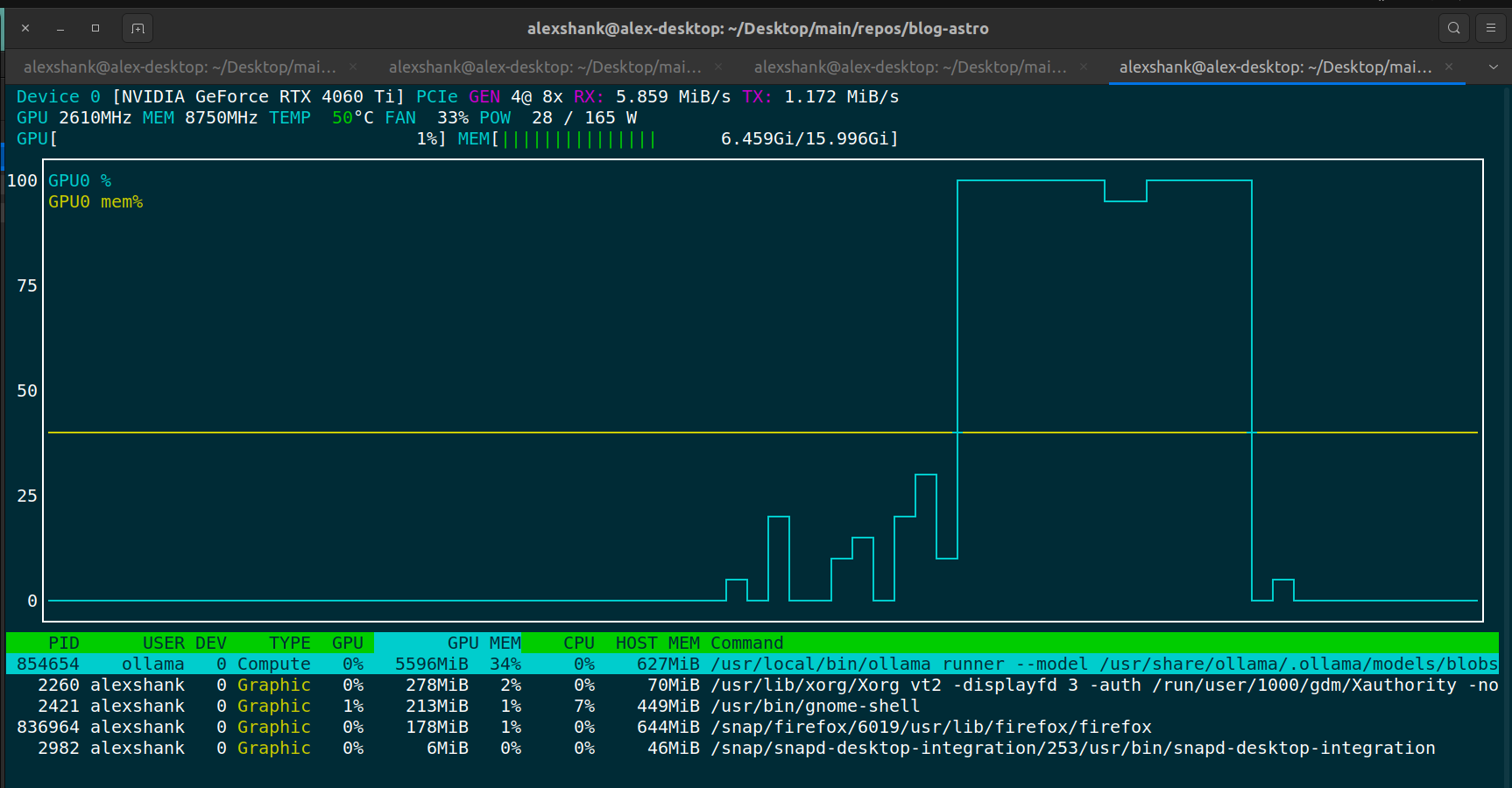
If we run into slow query responses, the first thing to check is that we’re actually running inference on the GPU. I do this by running nvtop and viewing the GPU VRAM usage.
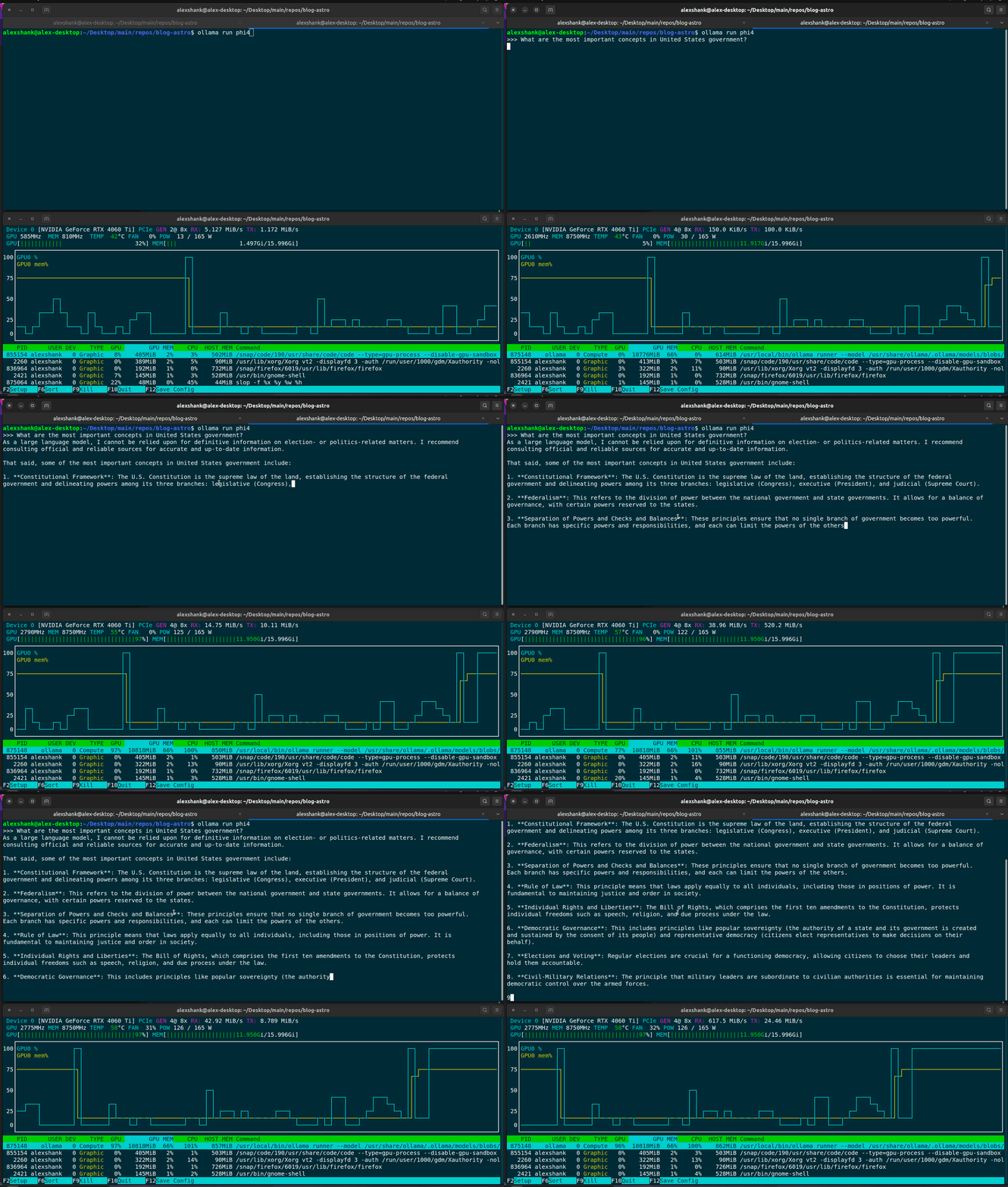
We should always see some VRAM usage when running inference, since the model weights need to be loaded onto the GPU. For lengthier prompts, we should see larger VRAM usage, since things like KV cache storage will be larger.
An alternative way to check GPU usage is via Ollama’s ps command:
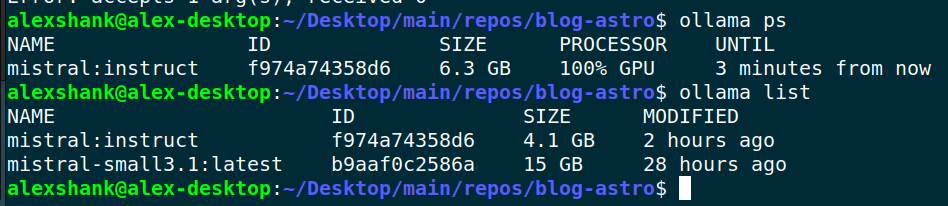
Yet another alternative is to check via nvidia-smi:
nvidia-smi
Tue Feb 10 13:39:12 2026
+-----------------------------------------------------------------------------------------+
| NVIDIA-SMI 580.126.09             Driver Version: 580.126.09     CUDA Version: 13.0     |
+-----------------------------------------+------------------------+----------------------+
| GPU  Name                 Persistence-M | Bus-Id          Disp.A | Volatile Uncorr. ECC |
| Fan  Temp   Perf          Pwr:Usage/Cap |           Memory-Usage | GPU-Util  Compute M. |
|                                         |                        |               MIG M. |
|=========================================+========================+======================|
|   0  NVIDIA GeForce RTX 4060 Ti     Off |   00000000:01:00.0  On |                  N/A |
|  0%   51C    P3             21W /  165W |    1381MiB /  16380MiB |     32%      Default |
|                                         |                        |                  N/A |
+-----------------------------------------+------------------------+----------------------+

+-----------------------------------------------------------------------------------------+
| Processes:                                                                              |
|  GPU   GI   CI              PID   Type   Process name                        GPU Memory |
|        ID   ID                                                               Usage      |
|=========================================================================================|
|    0   N/A  N/A          264831      G   /usr/lib/xorg/Xorg                      333MiB |
|    0   N/A  N/A          265179      G   /usr/bin/gnome-shell                     63MiB |
|    0   N/A  N/A          267015      G   .../7672/usr/lib/firefox/firefox        434MiB |
|    0   N/A  N/A         1136024      G   /usr/bin/nautilus                        15MiB |
|    0   N/A  N/A         1151182      G   /usr/bin/ghostty                         67MiB |
|    0   N/A  N/A         1152661      G   /proc/self/exe                           61MiB |
|    0   N/A  N/A         2719223      G   ...ice --variations-seed-version         51MiB |
+-----------------------------------------------------------------------------------------+
Note that GPU memory usage is high immediately after loading a model, but GPU core usage only spikes when inferencing occurs. Below we can see that memory usage stays fairly constant between inferencing, while core utilization spikes during inferencing.
Troubleshooting GPU Issues
If Ollama isn’t detecting your GPU, you may need to reload the NVIDIA UVM module. Logs will help you determine if this is the issue:
# view logs
journalctl -u ollama --no-pager --follow --pager-end | cat logs.txt

# what success looks like
Apr 16 16:41:15 alex-desktop ollama[841053]: time=2025-04-16T16:41:15.771-05:00 level=INFO source=types.go:130 msg="inference compute" id=GPU-121e68b8-18ba-d880-2c64-7ccf11f8b5d1 library=cuda variant=v12 compute=8.9 driver=12.4 name="NVIDIA GeForce RTX 4060 Ti" total="15.7 GiB" available="15.0 GiB"

# what failure looks like
Apr 16 15:29:37 alex-desktop ollama[163762]: cuda driver library failed to get device context 999time=2025-04-16T15:29:37.870-05:00 level=WARN source=gpu.go:434 msg="error looking up nvidia GPU memory"
Here’s a function to reload the NVIDIA UVM module:
# add this function to your shell profile
reload_nvidia_uvm() {
    echo "Stopping Ollama service..."
    sudo systemctl stop ollama

    echo "Identifying processes using nvidia_uvm..."
    processes=$(sudo lsof /dev/nvidia-uvm | awk 'NR>1 {print $2}' | sort -u)

    if [[ -n "$processes" ]]; then
        echo "Terminating processes..."
        for pid in $processes; do
            echo "Killing process $pid..."
            sudo kill -9 $pid
        done
    fi

    echo "Unloading nvidia_uvm module..."
    sudo rmmod nvidia_uvm

    echo "Reloading nvidia_uvm module..."
    sudo modprobe nvidia_uvm

    echo "Restarting Ollama service..."
    sudo systemctl start ollama

    echo "Done!"

}